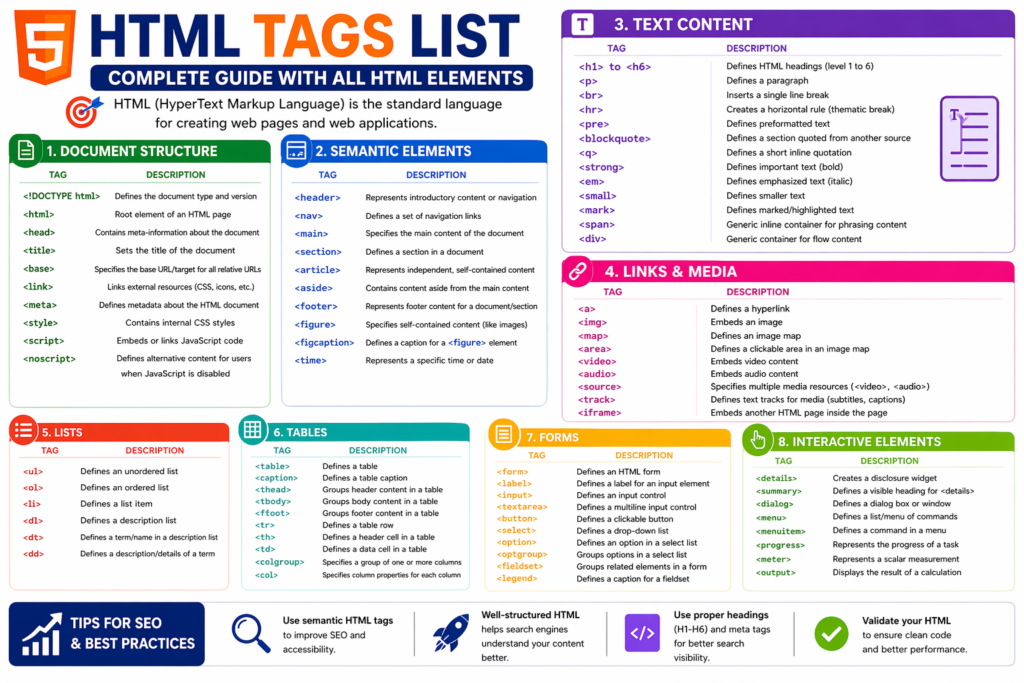
HTML Tags List: Complete Guide with Examples (Beginner to Advanced)
If you’re learning web development, one of the first and most important things you need to understand is the HTML tags list.
HTML tags are the building blocks of every webpage. They define:
- Structure
- Content
- Layout
Without HTML tags, websites simply wouldn’t exist.
This guide will help you understand:
- All HTML tags
- Their usage
- Real examples
- Best practices
Learn basics → /html-basics
What are HTML Tags?
What are HTML tags?
HTML tags are elements used to structure and display content on a webpage, such as headings, paragraphs, images, and links.
HTML tags are elements used to structure and display content on a webpage, such as headings, paragraphs, images, and links.
Basic HTML Tags List
Complete HTML Tags List
Structure Tags
| Tag | Description |
|---|---|
<html> | Root element |
<head> | Metadata section |
<body> | Main content |
<title> | Page title |
Text Formatting Tags
Link & Media Tags
List Tags
Table Tags
Form Tags
Detailed Explanation with Examples
Example: Heading
<h1>Main Heading</h1>Example: Paragraph
<p>This is a paragraph.</p>Example: Image
<img src="image.jpg" alt="Example">Example: List
<ul>
  <li>Item 1</li>
</ul>
Example: Form
<form>
  <input type="text">
</form>
HTML Tags Structure Example
<!DOCTYPE html>
<html>
<head>
  <title>Example</title>
</head>
<body>
  <h1>Hello</h1>
  <p>Welcome</p>
</body>
</html>
Semantic vs Non-Semantic Tags
| Semantic | Non-Semantic |
|---|---|
| header | div |
| article | span |
| nav | div |
Learn more → /html-vs-html5
Benefits of Using Proper HTML Tags
- Better SEO
- Improved readability
- Accessibility
- Clean structure
Common Mistakes
- Missing closing tags
- Wrong nesting
- Overusing
<div> - Ignoring semantic tags
Best Practices
- Use semantic HTML
- Keep code clean
- Use proper structure
- Validate HTML
People Also Ask
What are HTML tags?
They are elements used to structure webpages.
How many HTML tags are there?
There are 100+ HTML tags.
Which HTML tag is most important?<html>, <head>, and <body>.
Quick Summary
Quick Summary:
HTML tags define the structure and content of a webpage and are essential for web development.
HTML tags define the structure and content of a webpage and are essential for web development.
FAQs
1. What are HTML tags?
They define webpage structure.
2. How many HTML tags are there?
There are many tags used in HTML.
3. What is the most important tag?
<html> is the root element.
4. Are semantic tags important?
Yes, they improve SEO.
5. Can I use div everywhere?
No, use semantic tags.