Web Development Roadmap: A Complete Step-by-Step Guide for Beginners (2026)
Introduction
Web development is one of the most in-demand skills in 2026. Every business, startup, and creator needs a website or web application, which means skilled developers are always in demand.
If you’re wondering how to become a web developer, the good news is: you don’t need a degree. What you need is a clear roadmap, consistent practice, and real projects.
This guide will walk you step-by-step through a complete web development roadmap, starting from zero knowledge and taking you toward becoming a job-ready developer.
Whether you’re a student, freelancer, or career switcher, this web development for beginners guide is designed to help you succeed.
What is a Web Development Roadmap?
A web development roadmap is a structured step-by-step guide that helps beginners learn the skills, tools, and technologies required to become a web developer.
A web development roadmap is a step-by-step path to learn frontend, backend, tools, and real-world skills needed to become a developer.
What is Web Development?
Web development is the process of building websites and web applications that run on the internet. It includes everything from creating simple static pages to complex platforms like e-commerce sites and social networks.
In simple terms:
- HTML → Structure
- CSS → Design
- JavaScript → Functionality
Together, they form the foundation of every website.
Why Choose Web Development in 2026?
Web development is one of the best career choices today because:
High Demand
Companies worldwide need developers.
Remote Opportunities
Work from anywhere, including freelance.
High Salary Potential
Skilled developers earn competitive income.
Low Entry Barrier
You can start with just a laptop and internet.
Types of Web Development
Understanding different roles helps you choose your path.
Web development is divided into frontend (design), backend (server logic), and full stack (both frontend and backend).
| Type | Description | Technologies |
|---|---|---|
| Frontend | UI design | HTML, CSS, JS |
| Backend | Server logic | PHP, Node.js |
| Full Stack | Both | All above |
Frontend Development
Frontend developers build what users see on the screen.
They focus on:
- Layout
- Colors and design
- Responsiveness
Backend Development
Backend developers handle:
- Server logic
- Databases
- APIs
Full Stack Development
A full stack developer does both frontend and backend work
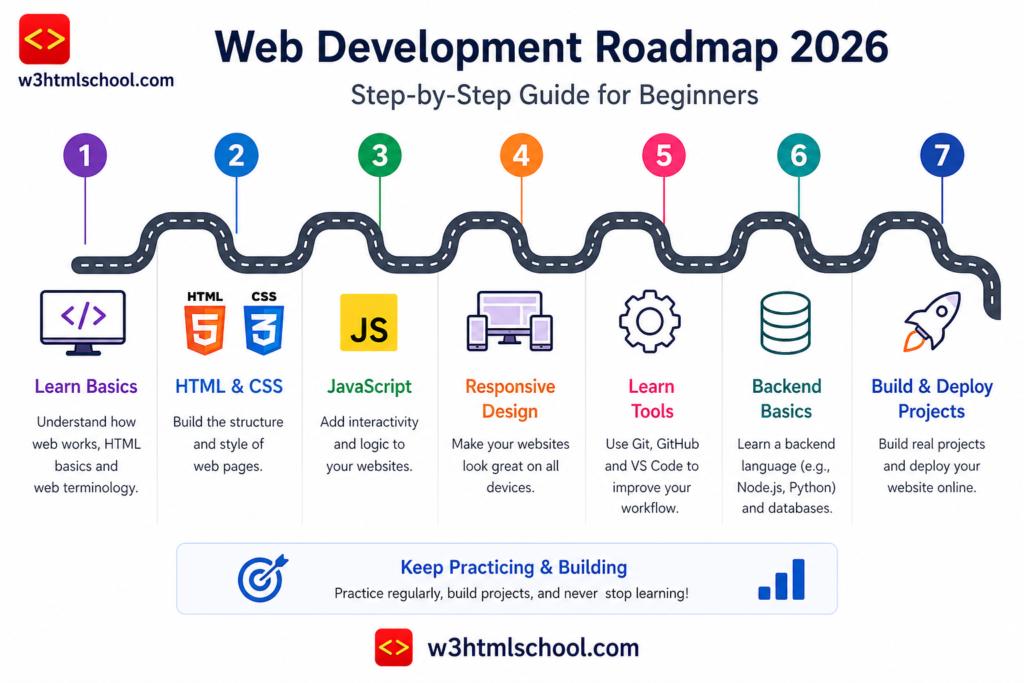
Step-by-Step Web Development Roadmap
This is the most important section. Follow it step-by-step.
Step 1: Learn HTML (Foundation)
HTML is the starting point of your coding roadmap 2026.
What to Learn:
- Tags and elements
- Headings, paragraphs, links
- Forms and inputs
- Semantic HTML
👉 Learn here: https://w3htmlschool.com/html/
👉 Tags guide: https://w3htmlschool.com/html-tags-and-attributes-complete-guide-with-examples/
👉 Structure: https://w3htmlschool.com/html-document-structure-guide-examples-best-practices/
Goal:
Build a simple webpage with text, images, and links.
Step 2: Learn CSS (Design)
CSS makes your website visually appealing.
Topics:
- Colors, fonts, spacing
- Box model
- Flexbox and Grid
- Responsive design
Goal:
Create a mobile-friendly website layout.
Step 3: Learn JavaScript (Logic)
JavaScript brings life to your website.
Topics:
- Variables and functions
- Loops and conditions
- DOM manipulation
- Events
Goal:
Create interactive features like buttons and forms.
Step 4: Version Control (Git & GitHub)
Git helps you track changes and collaborate.
Learn:
- Git basics
- Commit, push, pull
- GitHub repositories
Why Important?
Every developer uses Git. It’s a must-have skill.
Step 5: Frontend Frameworks
Once you know JavaScript, move to frameworks.
Recommended:
- React → Most popular
👉 Learn React: https://w3htmlschool.com/react-tutorial/
Other options:
- Vue
- Angular
Goal:
Build fast, modern web applications.
Step 6: Backend Development
Now move to server-side programming.
Choose One:
- PHP → Beginner-friendly
https://w3htmlschool.com/php-syntax-basic-structure/ - Node.js → JavaScript-based
Topics:
- Server logic
- Authentication
- APIs
Step 7: Databases
Websites need to store data.
Learn:
- MySQL (SQL database)
- MongoDB (NoSQL database)
Goal:
Store user data and application data.
Step 8: APIs & Integration
APIs allow apps to communicate.
Learn:
- REST APIs
- Fetch API
- JSON
Example:
Fetching data from an API and displaying it on a webpage.
Step 9: Deployment
Make your website live.
Tools:
- Vercel
- Netlify
- GitHub Pages
Learn:
- Hosting
- Domains
- SSL
Step 10: Build Projects (MOST IMPORTANT)
This is where real learning happens.
To become a web developer, learn HTML, CSS, JavaScript, build projects, and practice consistently while improving your skills step by step.
Project Ideas:
- Portfolio website
- Blog website
- To-do app
- E-commerce site
Projects = Experience = Job readiness
Tools You Must Learn
These tools make development easier:
VS Code
Code editor
GitHub
Code hosting
Browser DevTools
Debugging
Postman
API testing
Skills Required
To succeed as a developer, you need more than coding.
Problem Solving
Think logically
Debugging
Fix errors efficiently
Communication
Explain your ideas
Continuous Learning
Technology keeps evolving
Common Mistakes
Avoid these beginner mistakes:
Learning without projects
Skipping basics
Tutorial addiction
Not practicing
Best Practices
Practice daily
Build real projects
Read documentation
Join communities
FAQs
How long does it take to become a web developer?
It usually takes 6–12 months with consistent practice.
Do I need a degree?
No, skills matter more than degrees.
Which language should I start with?
Start with HTML, CSS, and JavaScript.
Can I learn web development for free?
Yes, many free resources are available online.
What should I build first?
Start with a portfolio or simple website.