List of Semantic HTML Tags (Complete Guide with All Tags)
The List of Semantic HTML Tags is one of the most important topics for beginners learning web development. Semantic HTML helps you write cleaner, more meaningful code that both browsers and search engines can understand.
Semantic tags describe the purpose of content, not just how it looks. This improves SEO, accessibility, and maintainability.
For example:
<div>→ no meaning<header>→ clearly defines header
Understanding semantic HTML tags is essential if you want to build modern, SEO-friendly websites.
What are Semantic HTML Tags?
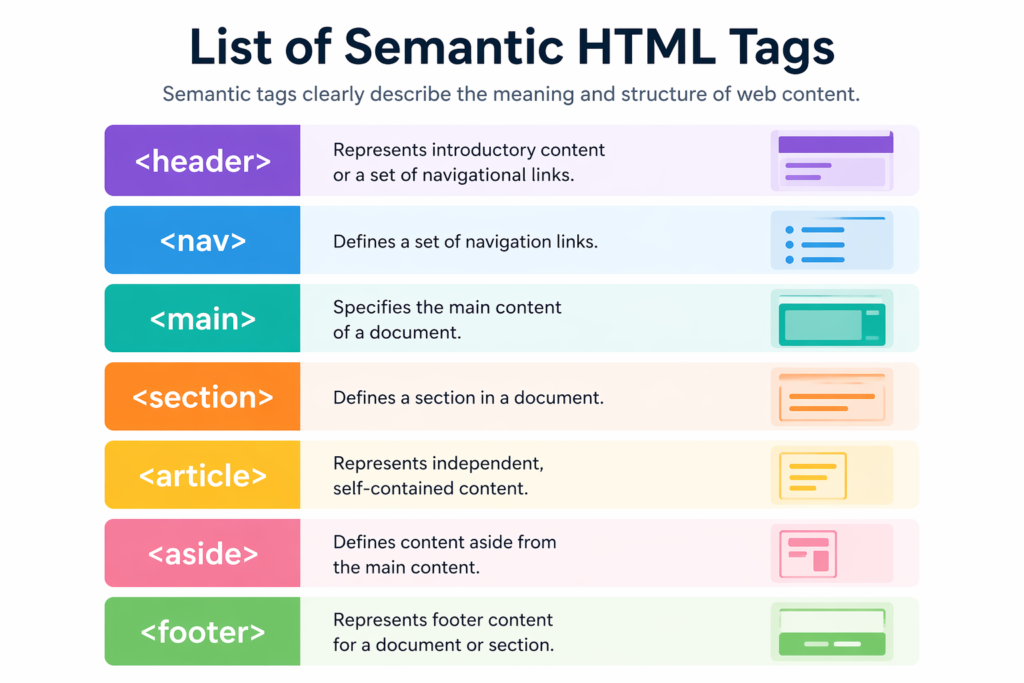
Semantic HTML tags are elements that clearly describe the meaning and structure of web content, such as header, article, and footer.
Complete List of Semantic HTML Tags
Here is the complete list of semantic HTML tags:
| Tag | Description | Example Use |
|---|---|---|
<header> | Defines header | Top section |
<nav> | Navigation links | Menu |
<main> | Main content | Page body |
<section> | Section | Content blocks |
<article> | Independent content | Blog post |
<aside> | Sidebar | Ads/info |
<footer> | Footer | Bottom section |
<figure> | Media content | Images |
<figcaption> | Caption | Image text |
<mark> | Highlight text | Highlight |
<time> | Date/time | Blog date |
<details> | Expandable content | FAQ |
<summary> | Summary of details | Title |
<dialog> | Dialog box | Popup |
<address> | Contact info | Footer info |
<strong> | Important text | Bold meaning |
<em> | Emphasized text | Italic meaning |
Explore more tags → /html-tags-guide
Categorized Semantic HTML Tags
Layout Tags
<header><footer><main><section><article><aside>
Used for page structure
Text-Level Semantic Tags
<mark><time><strong><em>
Used inside content
Media Tags
<figure><figcaption>
Used for images/media
Interactive Tags
<details><summary><dialog>
Used for user interaction
Detailed Explanation of Each Semantic Tag
<header>
Defines top section of page.
<header>
  <h1>Website</h1>
</header>
<nav>
Navigation menu.
<nav>

Navigation menu.
<main>
Main content.
<main>
  <p>Main content</p>
</main>
<section>
Content section.
<section>
  <h2>About</h2>
</section>
<article>
Independent content.
<article>
  <h2>Blog Post</h2>
</article>
<aside>
Sidebar content.
<aside>Sidebar</aside><footer>
Bottom section.
<footer>Footer</footer><figure> & <figcaption>
<figure>
  <img src="img.jpg">
  <figcaption>Caption</figcaption>
</figure>
<mark>
Highlight text.
<mark>Important</mark><time>
Date/time.
<time datetime="2026-01-01">Jan 1</time><details> & <summary>
<details>
  <summary>Click</summary>
  <p>Hidden content</p>
</details>
<dialog>
Popup dialog.
<dialog open>Popup</dialog><address>
Contact info.
<address>Contact info</address><strong> & <em>
<strong>Important</strong>
<em>Emphasis</em>
Example: Complete Semantic HTML Page
<body>

<header>
  <h1>My Website</h1>
</header>

<nav>
  <a href="#">Home</a>
</nav>

<main>
  <article>
    <h2>Blog Post</h2>
    <p>Content...</p>
  </article>
</main>

<aside>
  <p>Sidebar</p>
</aside>

<footer>
  <p>© 2026</p>
</footer>

</body>
Semantic vs Non-Semantic Tags
| Semantic | Non-Semantic |
|---|---|
| header | div |
| article | span |
| nav | div |
| footer | div |
Learn comparison → /html-vs-html5
Benefits of Using Semantic HTML
- Better SEO
- Improved accessibility
- Cleaner code
- Easy maintenance
- Better readability
Common Mistakes
- Overusing
<div> - Wrong tag usage
- Ignoring accessibility
- Multiple
<main>tags
FAQs
1. How many semantic HTML tags are there?
There are many semantic tags including header, footer, article, section, etc.
2. What are semantic HTML tags?
Tags that describe content meaning.
3. Why are semantic tags important?
They improve SEO and accessibility.
4. Can I use div instead?
Yes, but semantic tags are better.
5. What is the most important semantic tag?
<main> is very important.
Key Takeaways
- Semantic HTML improves SEO
- Makes code readable
- Helps accessibility
- Essential for modern web